Overview
The NPAV EDR Scan Policy Management feature enables administrators to centrally configure and control scheduled scanning and scan behavior for managed endpoints. Administrators can define scan schedules, select the types of files to scan, configure exclusions, and control scanning on removable drives according to organizational security requirements.
Scan Schedule
NPAV EDR allows administrators to configure automated scan schedules for endpoints. Administrators can define:
- Scan frequency, such as Weekly.
- Preferred scan time.
- Specific day for scheduled scanning.
This ensures that endpoints are regularly scanned without requiring manual intervention.
Scan Options
Administrators can configure which files should be included during a scan. Available options include:
- Executable Files – Scans executable files that can potentially contain or launch malicious code.
- All Files – Performs a comprehensive scan of files on the endpoint.
- User-Specified Extensions – Allows administrators to specify particular file extensions for scanning, such as
.CMD,.EML,.HTM, and.HTML.
The policy also provides an option to request the Administrator password before aborting a scan, helping prevent unauthorized users from stopping an active security scan.
File and Folder Exclusions
NPAV EDR allows administrators to configure specific files and folders to be excluded from scheduled or configured scans.
Administrators can specify:
- Excluded File Paths
- Excluded Folder Paths
This provides granular control over scanning policies while allowing trusted files or application directories to be excluded where required.
Removable Drive Scanning
NPAV EDR provides control over scanning activities on removable storage devices. Administrators can configure the Disable Autoscan on Removable Drive option according to organizational security requirements.
This helps organizations control how removable media is handled and scanned when connected to protected endpoints.
Centralized Policy Management
All scan configuration settings can be managed centrally through the NPAV EDR Management Console. Administrators can apply consistent scanning policies across managed endpoints, helping maintain a standardized security posture.
Key Benefits
- Centralized scan policy management.
- Automated scheduled scanning.
- Flexible file-type scanning options.
- User-defined file extension scanning.
- Controlled file and folder exclusions.
- Protection against unauthorized scan termination.
- Configurable removable-drive scanning.
- Consistent security policies across managed endpoints.
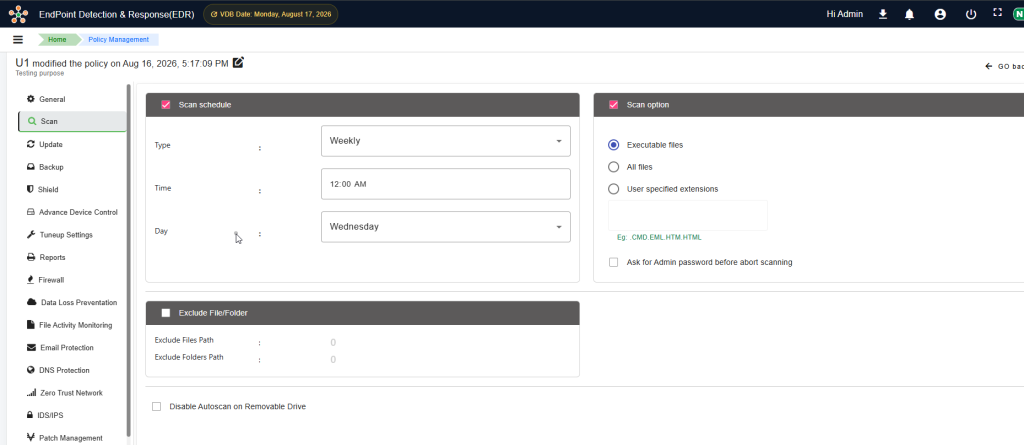
Figure: NPAV EDR – Scan Schedule and Scan Policy Configuration
