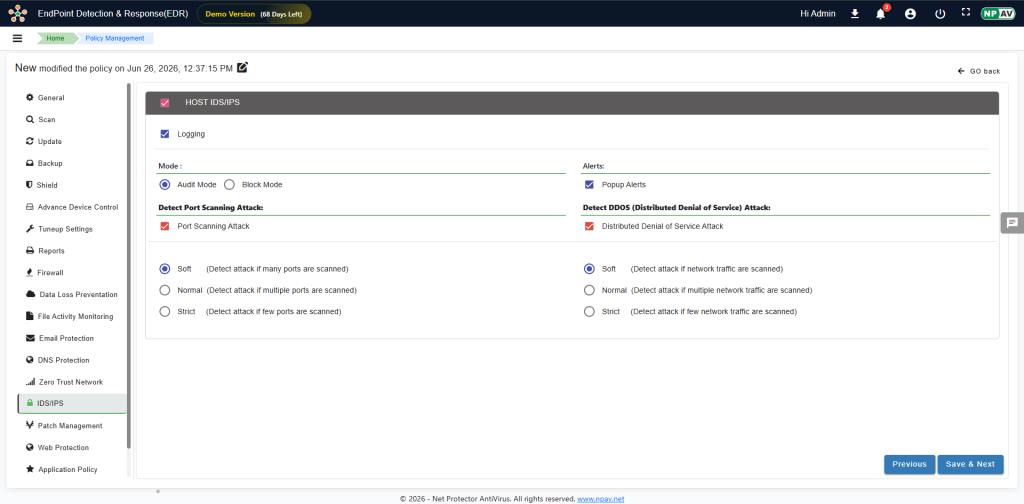
Intrusion Detection System (IDS) and Intrusion Prevention System (IPS). These systems proactively monitor your network by analysing network traffic and system calls to detect and mitigate suspicious activities.
- Intrusion Detection System (IDS): A system designed to monitor network traffic for suspicious activity and alert administrators when such activity is detected.
- Intrusion Prevention System (IPS): An advanced system that not only detects suspicious activity but also automatically takes action to prevent it.
Application Trust Levels and Resource Access Control
Beyond network-based threat detection, the solution provides the ability to restrict application activities within the system according to the trust level assigned to each application. Based on this assigned trust level, the solution can limit the rights of applications to access certain resources, including system and user files. This ensures that untrusted or low-trust applications are prevented from performing potentially harmful actions or accessing sensitive data.
- Trust-Based Activity Restriction: Application activities within the system are restricted according to the trust level assigned to the application.
- Resource Access Limitation: The rights of applications to access certain resources, including system and user files, are limited based on the application’s trust level.
Understanding Common Attack Types
EDR IDS/IPS is engineered to detect and protect against various types of network attacks, including:
Port Scanning Attacks
A port scan involves systematically sending data packets to different ports on a networked device to identify which ports are open and what services are operational. This technique is utilized for:
- Vulnerability Identification: Pinpointing potential weaknesses in a system’s defences.
- Traffic Analysis: Understanding the types of network traffic (e.g., web pages, emails, instant messages) handled by specific ports.
- Network Monitoring: Assisting network administrators in monitoring incoming and outgoing traffic.
While security analysts use port scanning to assess system security and identify open ports, cybercriminals exploit it to discover weak points within a network.
Distributed Denial of Service (DDoS) Attacks
A DDoS attack is a malicious attempt to disrupt the normal traffic of a targeted server, service, or network by overwhelming it with a flood of internet traffic from multiple compromised computer systems. This coordinated attack can lead to:
- Service Outages: Rendering websites or services inaccessible to legitimate users.
- Financial Losses: Resulting from downtime, lost revenue, and recovery efforts.
- Reputational Damage: Eroding user trust and damaging the organization’s image.
- Business Disruption: Halting critical business operations.
The primary objective of a DDoS attack is to crash or severely slow down online services, thereby making them unavailable to their intended users.
Configuring IDS/IPS Settings
To configure the EDR IDS/IPS settings, follow these steps:
- Enable or Disable HOST IDS/IPS Use the HOST IDS/IPS checkbox to toggle the feature ON or OFF.
- Enable Logging (Optional) To generate detailed reports of detected activities, select the Logging checkbox.
- Select Mode for Audit and Block Rules Choose one of the following operational modes:
- Audit Mode: Monitors suspicious activity without actively blocking it. This mode is ideal for observation and analysis.
- Block Mode: Actively blocks detected suspicious activity, providing immediate protection.
- Configure Alerts Enable or disable alerts as needed to receive notifications regarding detected threats.
- Detect Port Scanning Attacks Select the desired detection sensitivity level for port scanning attacks:
- Soft: Detects attacks where a significant number of ports are scanned.
- Normal: Detects attacks where multiple ports are scanned.
- Strict: Detects attacks even when only a few ports are scanned, offering the highest level of sensitivity.
- Detect DDoS (Distributed Denial of Service) Attacks Select the desired detection sensitivity level for DDoS attacks:
- Soft: Detects attacks involving a large volume of requests or many connections.
- Normal: Detects attacks with a moderate volume of requests or connections.
- Strict: Detects attacks with a lower threshold of requests or connections, providing the highest sensitivity.